

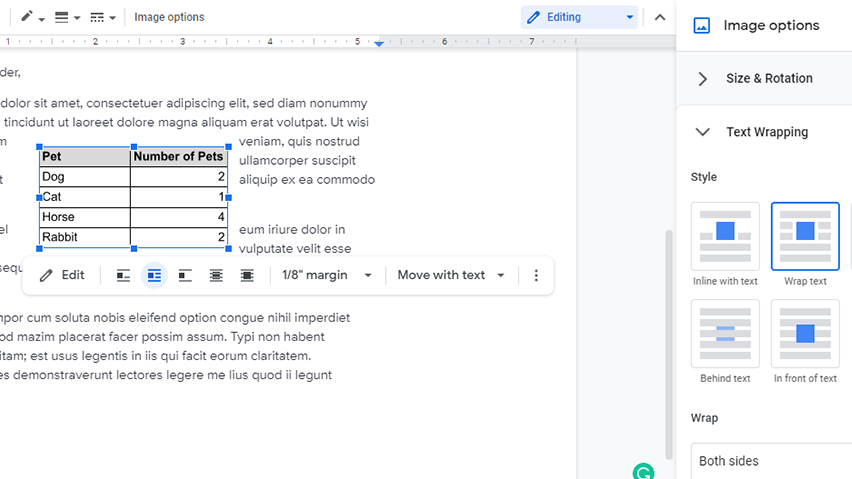
Formatting texts with Google Docs can be difficult for a beginner, especially when it comes to using features like wrapping texts. Wrapping text around an image is relatively easy, but using this tool becomes more challenging when wrapping other inserts, such as tables.
Text wrapping refers to how texts arrange themselves around another element. This feature is often done to seamlessly integrate images or objects into a document’s texts. Although text wrapping affects the appearance of the text, the formatting itself is actually done on the object, not the text.
There are several types of text wrapping settings available in Google Docs, the most common of which is “In line with text;” This function places the object on the same horizontal line as the texts. Other types of text wrapping include “Wrap text,” “Break text,” “Behind Text”, and “In front of text.” Google Docs does not allow users to set the text wrapping of a table directly. Luckily, a workaround can help users achieve the same effect.
How to Wrap Text Around a Table in Google Docs
1. This workaround involves the use of Google Sheets. First, create a table on Google Docs.

2. Highlight the table, and copy it as usual.

3. Next, open the Google Doc and go to the Toolbar’s Insert > Drawing > New. This action will open a window that lets you create drawings for the document.

4. Paste the table to the Drawing window, then click Save and Close. This will convert the table into an image.

5. Now, to wrap text around the table, select the image of your table. Go to Format > Image > Image options on your Toolbar. The Image options menu should appear on the right side of your window.

6. Under Text Wrapping, select Wrap text. Just like that, texts will now wrap around the table.